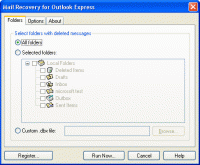
Mail Recovery for Outlook Express Publisher Review:
Recover deleted messages and mail from damaged folders and dbx files in Outlook Express. Searching across the several folders. A recovered message could be saved to email folder or text eml file.
Losing only a little bit of valuable information can cause a lot of trouble. But until no other letters are added to the folder with the deleted messages or until this folder is compacted, most of the data can be restored. Even if all messages are deleted and the Deleted folder is compacted, the deleted messages still remain in other folders. Unfortunately, standard Outlook Express tools do not allow us to restore deleted messages. It can be done with the program " Mail Recovery for Outlook Express " in just a few steps (every time you run the program, you'll be able to restore deleted messages with just a one mouse click!). When you restore files after deletion or hard disk failure, after the data was lost from the flash drive or as a result of incorrect system functioning, files of folders containing Outlook Express messages can be damaged. The work with such folders becomes much slower, and Outlook Express does not display most of the messages. But don't get disappointed, you can save some of your data! Even if most of it is damaged, and Outlook Express shows that there are no messages in the folder, you can still restore them. Some messages can be restored completely, and some - partially. Even partially recovered information can often be enough to understand what the message was about or to find important contacts. How to restore messages from damaged folders in Outlook Express? It can be also done with the program "Mail Recovery for Outlook Express" in just a few steps. The program will scan the specified folders and try to find and recover messages. Program Features # Restoring messages from all or selected folders, from .dbx files # Saving restored messages into a mail folder # Saving restored messages in text .eml files in the RFC822 format # Saving restored messages taking into account the folder structure # Restoring messages created within a certain time period.
Product homepage:
http://www.mapilab.com/outlook_express/mail_recovery/ Whats new in version 2.3.1: New feature has been added Requirements: any version of Microsoft Windows starting from Microsoft Windows 95/NT4 Operating system: WinXP,WinNT 4.x,Windows2000,Windows2003 Limitations: 15-day trial Release notes: Major update
Recover deleted ,corrupt or lost emails in eudora, can recover deleted items even if they have been cleared from the deleted items folder . Searches file structure to find all files to recover from or can add manually.
Price: $20, Rating: 8, Downloads: 114 Download
Regardless if you need targeted email addresses, 1st Email Spider is what you should use. It detects every single email on a site, not only those in mailto tags. Duplicates and invalid emails are instantly removed, try 1st Email Spider for free.
Price: $175.00, Rating: 8, Downloads: 112 Download
Secure and reliable migration can be achieved with Lotus Notes to Outlook conversion software- a tool for system administrators, technicians and individuals, who need to migrate from Lotus Notes Domino server to Exchange Server.
Price: $250, Rating: 10, Downloads: 103 Download
Convert EDB to PST with effective and efficient EDB recovery tool. It helps to recover mailboxes from corrupt EDB file and saves them to PST.
Price: $399, Rating: 7, Downloads: 101 Download
Kernel for Outlook is known for fast and error free Microsoft Outlook repair and recovery. The software recovers emails, journals, contacts, to do lists, images, attachments, zipped attachments, etc. from damaged PST file with full accuracy.
Price: $49, Rating: 9, Downloads: 91 Download
User Rating
Rating:2.2 out of
5 Based on13 ratings.
13 user reviews.

 Mail Recovery for Outlook Express 2.3.1 details